

Redaction that never leaves the building.
Prap Redact finds the names, faces, license plates and numbers in documents, body-camera video and audio, and covers them on your own PC. No cloud, no upload, no per-hour fees.
- Works with the network cable out
- Installs without admin rights
- $1,490 per user a year
Incident report
Case #: 26-004512Officer responded to a noise complaint in the parking lot.
Name: Jordan Avery Blake DOB: 04/12/1987
Address: 1450 Maple Street Apt 3
Phone (555) 201-7788 and email [email protected]
SSN 078-05-1120
Driver's License: B1234567 Plate: 7ABC123
The complaint was resolved and no citation was issued.
Try it. This is the real sequence, shown with invented data.
From a pile of records to a release you can defend, in four steps.
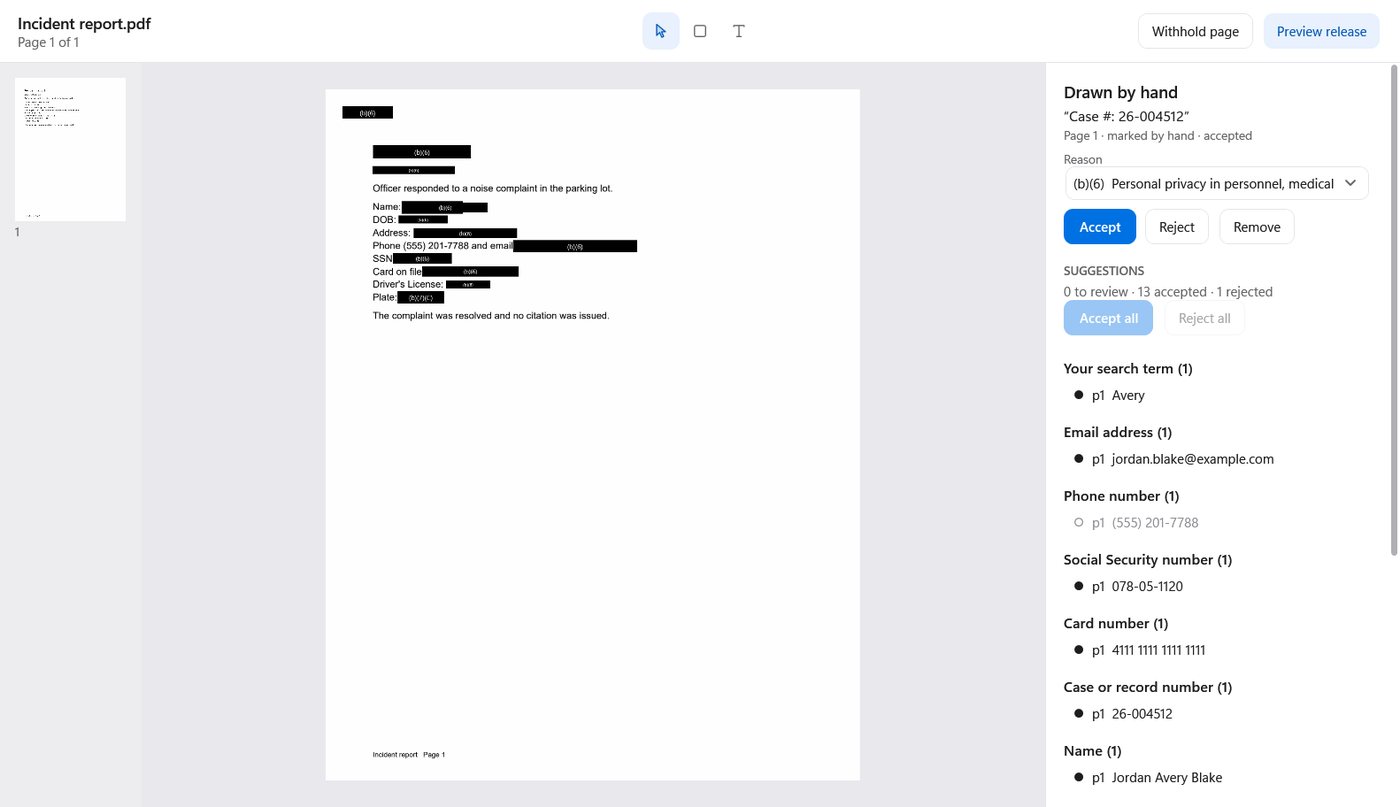
Drop in the whole request.
One request, one folder. Add PDFs, scans, Word and Excel files, Outlook emails with their attachments, photos, body-camera clips and 911 audio together. A ZIP is unpacked for you.
- Due date counted from your state's law
- Originals are copied, fingerprinted and never changed
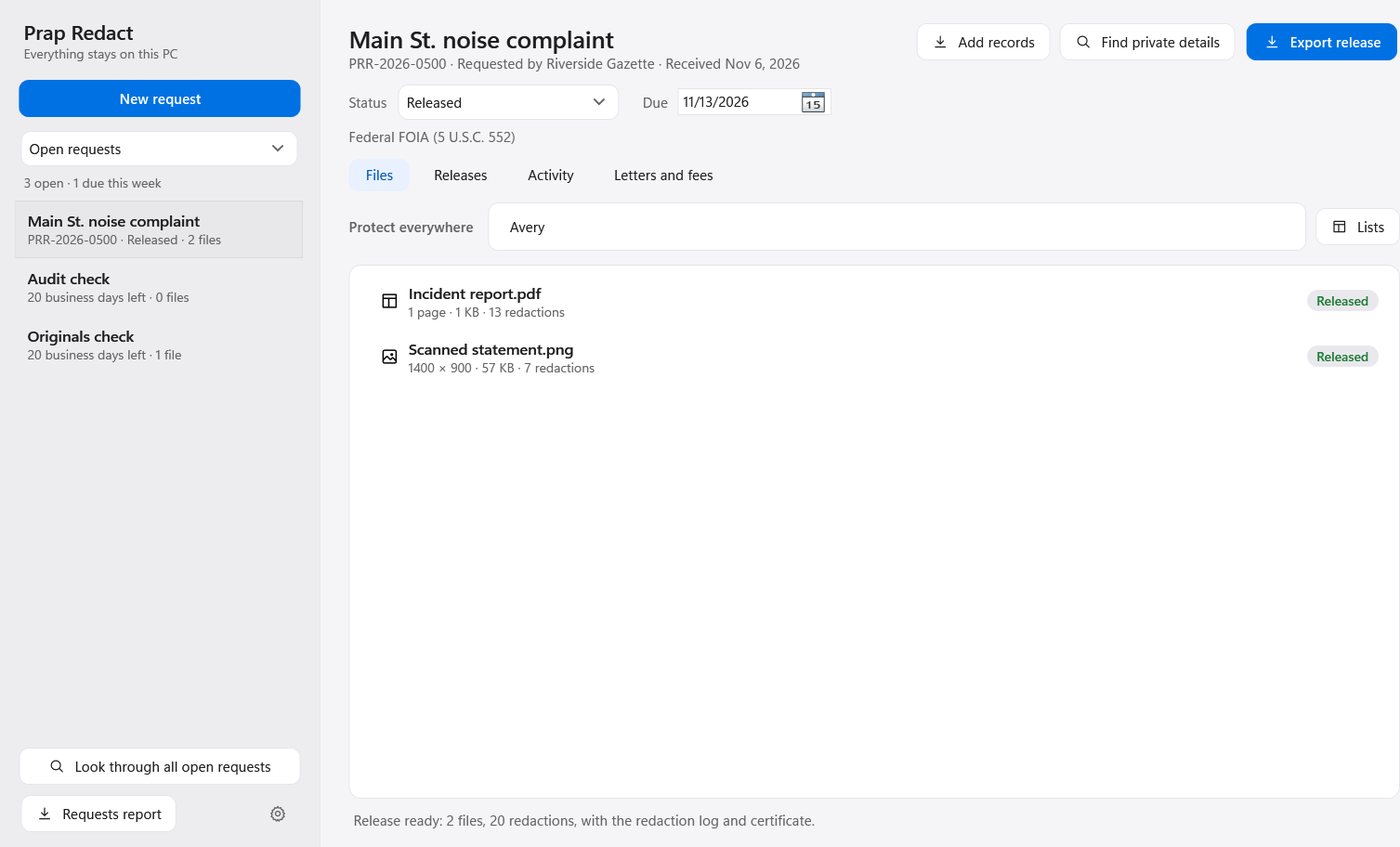
It finds the private details.
Press Find private details. Names, dates of birth, addresses, Social Security and card numbers, emails, phone numbers, license plates, faces and screens are marked for you, grouped by kind.
- Reads scans and photos, not only typed text
- Add your own names and words to protect everywhere
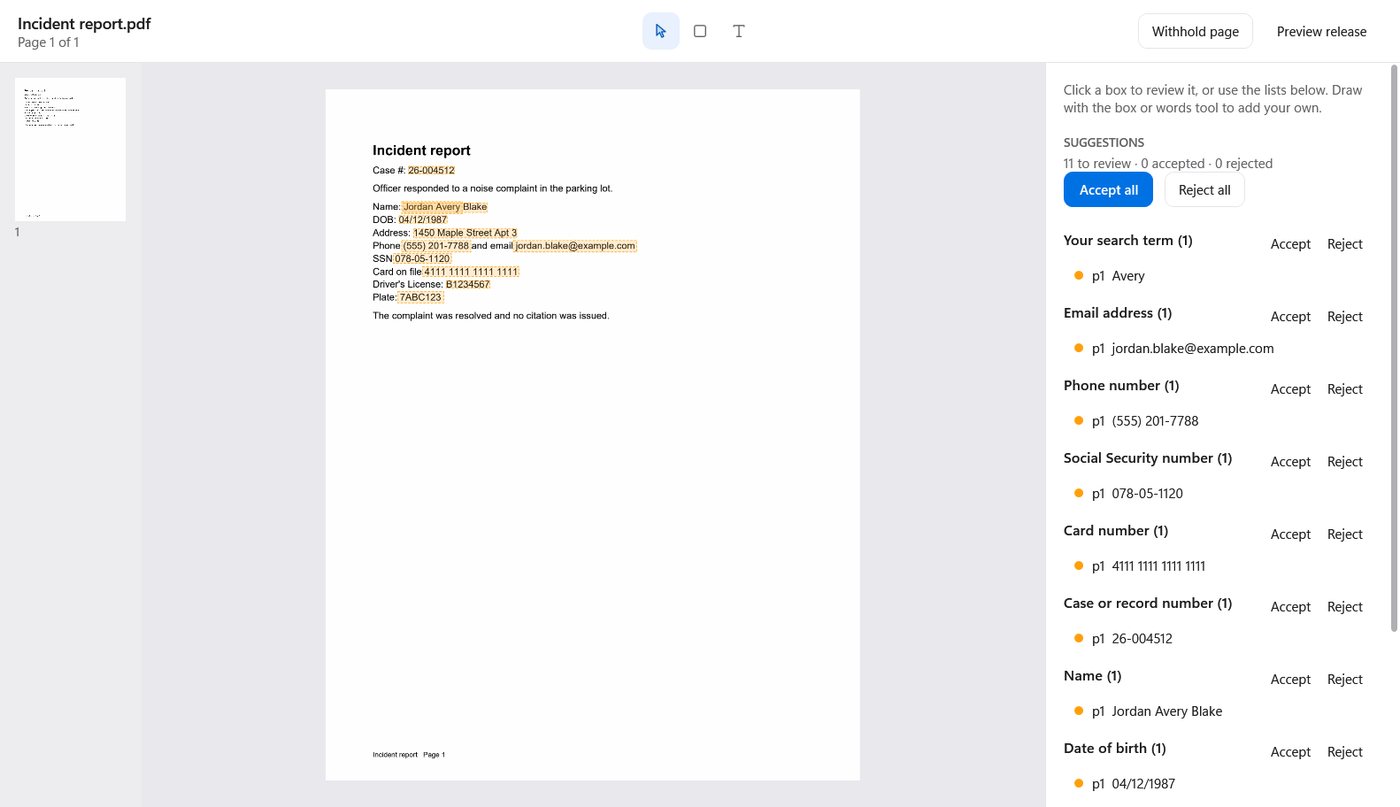
You decide. In video and audio too.
Nothing is covered until a person accepts it. In video, a box follows the face or plate from frame to frame. In audio, a spoken name or number is bleeped, and the transcript shows exactly what was removed.
- Every redaction carries its exemption
- A second person can approve before release
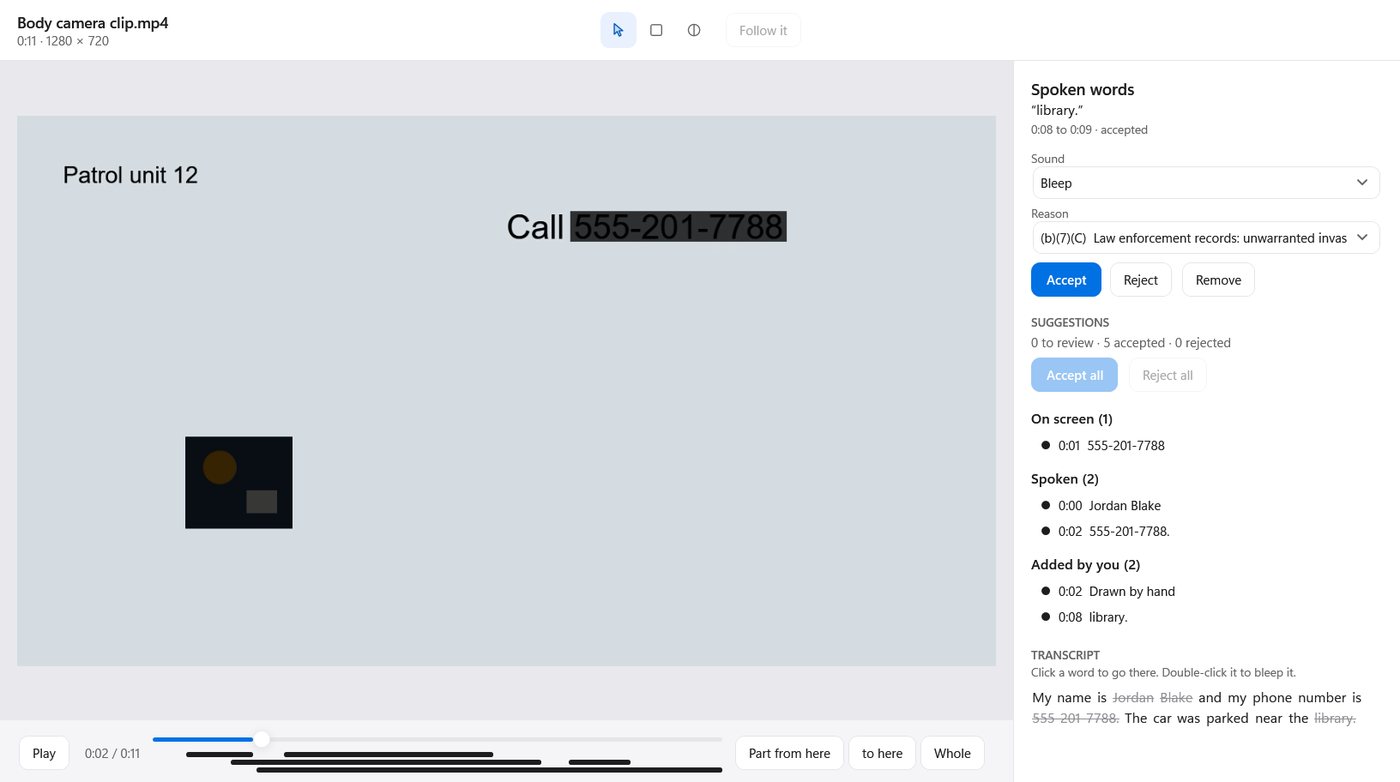
Release, with the paperwork done.
Export gives you the redacted copies, a redaction log that never repeats the redacted words, and a certificate with a fingerprint of every file. The text under a black box is gone from the file, not hidden.
- Bates numbers and watermarks if you use them
- An audit trail that shows any later change
The details your office redacts every day.
People
Names after labels, dates of birth, home addresses, faces, and heads seen from behind.
Numbers
Social Security, driver's license, card, account, case and medical record numbers, phone numbers, VINs.
Vehicles and screens
License plates on cars, and computer monitors, laptops and phones that show records in the background.
Spoken words
"My name is…", a phone number read aloud, any word on your list. Spanish and other languages are translated to English for review.
Your own lists
Officers, juveniles, informants, addresses: keep lists with a reason for each, and reuse them on every request.
Everything else, by hand
Draw a box, select words, or keep one area visible and blur the rest. Tell a box to follow what it covers.
Evidence shouldn't have to travel to be redacted.
Most redaction tools are websites: your records go up to someone else's servers and come back. Prap Redact is a program on the PC you already have.
| A typical cloud redaction service | Prap Redact | |
|---|---|---|
| Where your records go | Uploaded to the vendor's servers | Nowhere. They stay in your own folders |
| Video | Often billed by the hour, or capped | As much as you have, at one price |
| Internet | Required, and large uploads are slow | Not needed at all |
| What IT has to review | A vendor's cloud, its data agreement, its staff | One signed installer that never goes online |
| If you stop paying | Your work lives in their account | Your requests and files are still yours, on your disk |
Other redaction tools list at about $3,300 to $4,500 per user a year, or charge by the hour of video (public price lists and state purchase records, November 2026).
Short to review. Simple to roll out.
We send the security statement and the accessibility report (VPAT 2.5) before you install anything.
No network code
No account, no telemetry, no update check, no license server. Block it at the firewall and nothing changes.
A signed MSI
Signed by Avielle Holdings. Installs per person without admin, or for the whole machine with ALLUSERS=1. Quiet install and uninstall.
Group Policy templates
Set the requests folder, the records law, the license, and approval before release for every PC. Reviewer names come from Windows accounts.
Roles from your AD groups
Who may redact, who may approve, who may change settings. Everyone else opens a request read-only.
Shared work, safely
Several reviewers share one requests folder on your file server. If the connection drops, work is kept on the PC and written back in order.
Evidence integrity
SHA-256 of every original and every released copy, and an audit trail where each line is chained to the one before.
Whatever the request brings in.
One price. Printed here.
Most offices can buy it under their no-bid limit. We send a quote and invoice against your purchase order.
One person
For the clerk or records officer who handles requests alone.
An office
For a records unit. Under $1,000 a person, with approval by a second reviewer.
A department
For a city, county or agency rolling it out with Group Policy.
Everything included
Documents, video and audio in every plan.
No meter
No limit on hours of video or pages.
Updates and support
By email, from the people who build it.
30-day trial
On your real records, after a short demo.
What offices ask us first.
Does it catch everything?
No tool does, and we won't tell you otherwise. Prap Redact does the finding so your staff can spend their time on judgment: it suggests, a person accepts or rejects each one, and anything it missed you mark by hand in a few seconds.
Is it AI? Where does the AI run?
Yes, and only on your PC. Text reading, face and object detection and speech recognition all run locally, on the processor you already have. Nothing is sent to an AI service.
What about CJIS?
Criminal justice information never leaves your network, because the program never goes online. Our security statement walks through the CJIS policy areas so your security officer can check each one.
How do we try it?
Write to us. After a 20-minute demo we send your office a 30-day trial license to use with your real records. There is nothing to set up with us, and nothing to cancel.
What does it need?
Windows 10 or 11, 64-bit. A recent laptop scans video at about twice real time. No graphics card, no server, no database.
What happens to our work if the license ends?
Your requests, originals and releases are ordinary files in your own folders. They stay where they are and open again as soon as you renew. A subscription keeps working for 14 days past its end date, so a late purchase order never stops a request.
Who else uses it?
Prap Redact is new in 2026, and we're bringing on our first offices now. That's why you talk to the people who build it, and why your feedback shapes what comes next.
See it on one of your own records.
Send us a record you've already released. In a 20-minute call we'll redact it in front of you, then leave you a 30-day trial.
[email protected] · We answer within one working day. Prap Redact is made by Avielle Holdings.