
Capture your screen. Rewind what you missed.
Press and hold the left mouse button to capture anything. Mark it up, record it, send it, and save the last 30 seconds you didn't think to record.
No trial. No credit card. No ads. Installs in seconds, no admin needed.
A screenshot tool, a screen recorder, and a rewind button for your screen.
Three apps you'd pay for, or put up with. Prap is all of them.
Snipping Tool
Built in, and basic. No scrolling pages, no library, no rewind.
FREE · BASICSnagit
The powerful one. Now a subscription.
$39 A YEARLoom
Video messages. The free plan stops at 25 videos of 5 minutes.
$18 A MONTH PER PERSONPrap
Screenshots, scrolling pages, video, guides, bug reports, and rewind.
FREEThe everyday things first. Then the ones nothing else does.
No shortcut to remember.
Hold the left mouse button still, anywhere, in any app, even full screen. Prap's icon fills and you're already selecting. Let go and the picture is there, with Save one click away.
- The screen freezes the moment you pressed, so menus and pop-ups stay put
- Switch to Video to record that same area
- Prefer keys? Print Screen works too
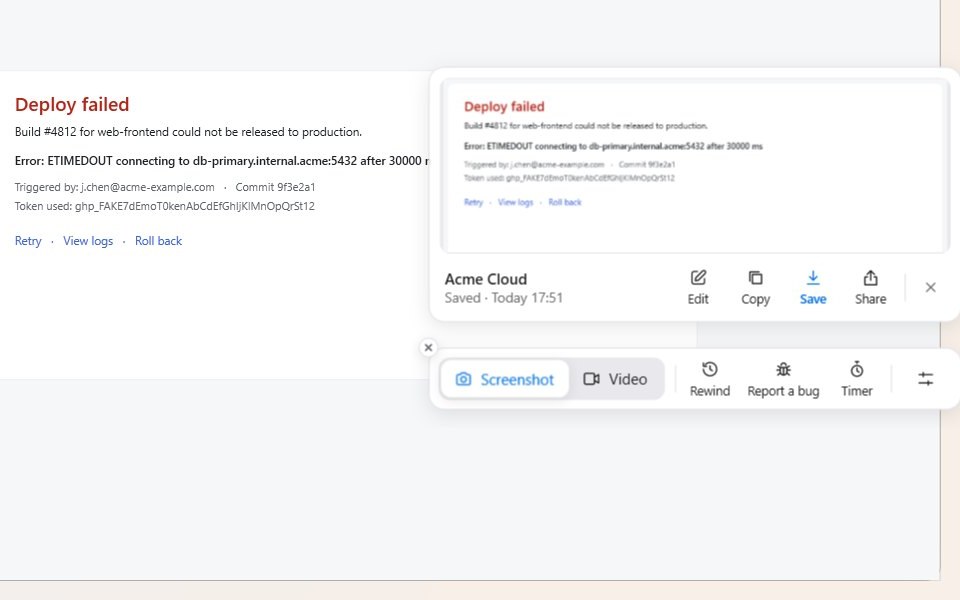
Missed it? Take it back.
The message that vanished. The error that flashed for a second. The bug that won't happen twice. Prap remembers the last 30 seconds of your screen, so you can save what already happened.
- Hold the left mouse button and choose Rewind, or pick it from the tray icon
- It saves the seconds before you reached for it, as a video you can trim
- Kept in memory on your PC only. Nothing is saved until you choose
From screenshot to explanation in seconds.
Arrows, numbered steps, callouts, blur, spotlight and crop, with quick styles that match your brand. Private details like card numbers and keys can be covered for you.
Bug reports developers thank you for.
“It just broke” becomes the whole story: a replay of the last seconds with every click marked, the screenshot, the web address and the system details, sent to the tool your team already uses.
Emails, card numbers, keys and passwords are covered before anything leaves your PC.
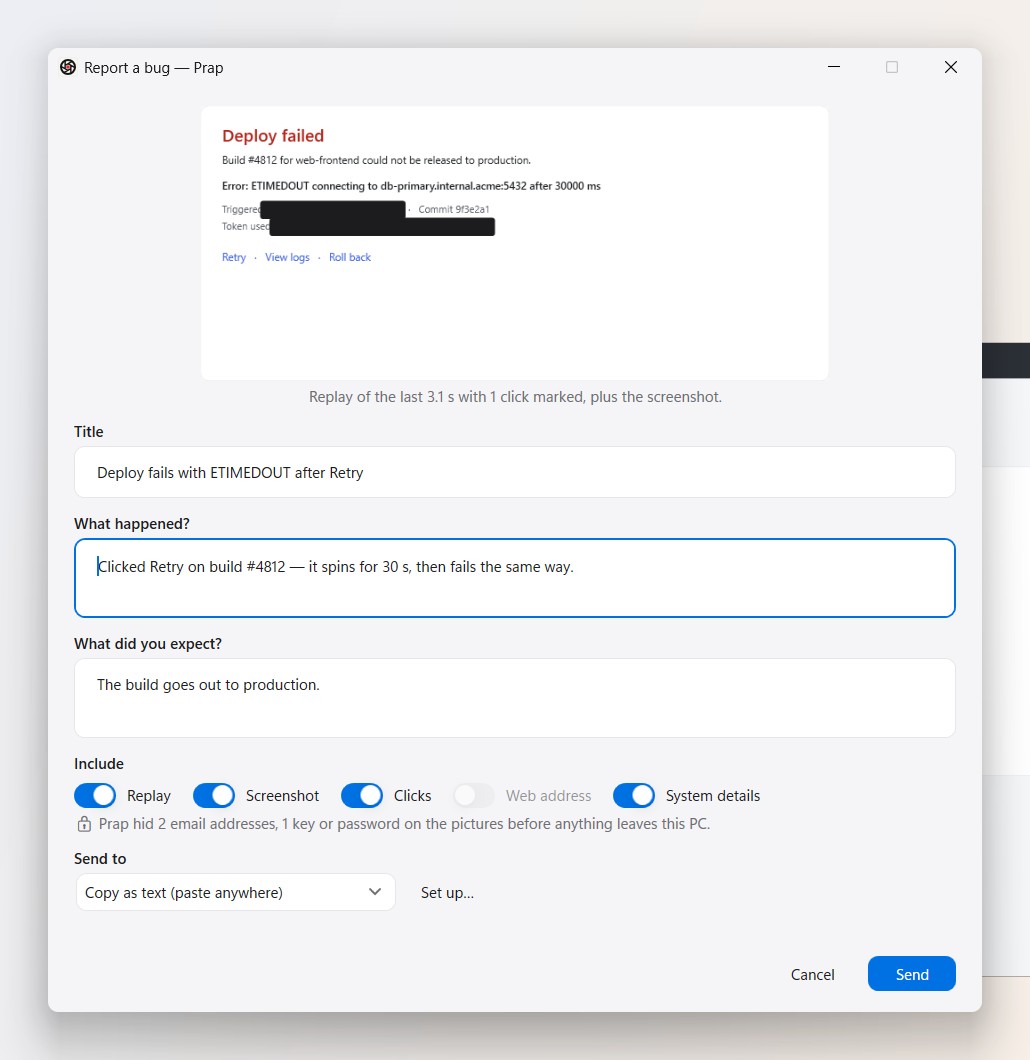
Explain it once. Never again.
Click through a task once. Prap names every button you pressed, takes every screenshot, hides anything private, and hands you a finished how-to.
- Paste into Notion, Confluence, Google Docs or an email
- Or save as Word, PDF, Markdown or a web page
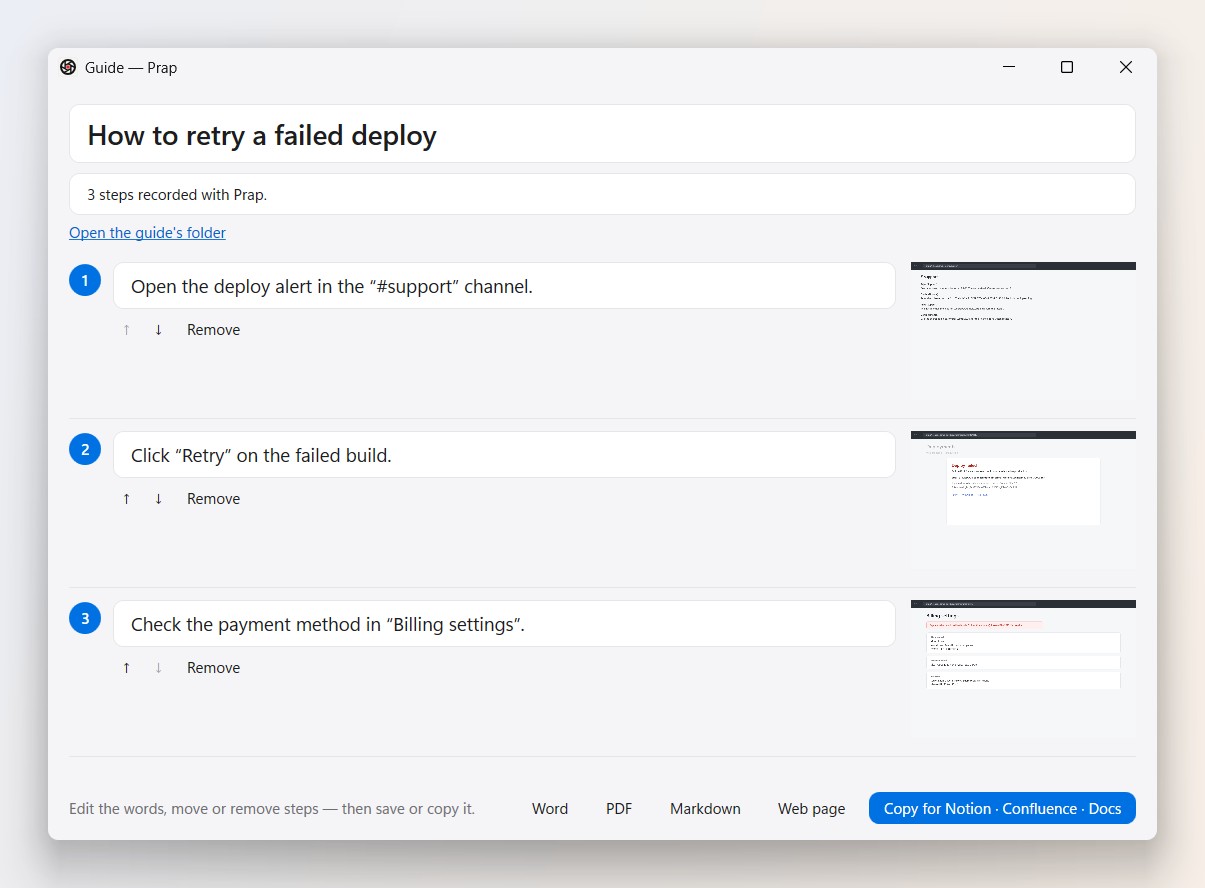
The rest of what you'd expect, and a few you wouldn't.
Capture any shape
An area, a window, a menu, the full screen, or a whole web page that scrolls, stitched into one picture.
Record your screen
With your voice, your camera in a bubble, notes only you can see, and your clicks shown. Fluffed a line? Redo the last few seconds.
Edit video like a document
Prap writes the transcript on your PC. Delete a sentence and it's gone from the video. The ums and long pauses go in one click.
Copy text from anything
Grab the words out of a picture, a video or an app that won't let you select them.
Send it anywhere
Copy it into chat, save it as PNG, PDF or MP4, email it, post it to Slack, or drop it in your own cloud folder.
Find it later
Every capture goes into a library you can search by the words inside the picture.
Your screen is your business.
Prap was built on one rule: what you capture belongs to you.
It stays on your PC
Pictures, videos, transcripts and the rewind memory stay on your computer, unless you send one yourself.
Hidden before it leaves
When you share, Prap covers emails, card numbers, keys and passwords first, without sending anything to check.
We keep almost nothing
No account needed. If you sign in, just your name and email. No ads. No tracking. Nothing sold. Privacy policy.
51 things Prap does, all free.
- Hold to capture
- Rewind 30 seconds
- Scrolling capture
- Window capture
- Menu capture
- Full screen
- Exact size
- Several areas at once
- Timed capture
- Speaker notes
- Redo the last part
- Trim by dragging
- Time-lapse
- Print Screen key
- HDR screens
- Arrows and shapes
- Numbered steps
- Callouts
- Blur and pixelate
- Spotlight
- Magnify
- Crop and resize
- Erase anything
- Move things in a picture
- Replace text in a picture
- Brand themes
- Torn edges and shadows
- Screen, voice and camera
- Camera background blur
- Click ripples
- Noise removal
- Auto-zoom on clicks
- Cut the pauses
- Edit video by text
- Offline transcripts
- Chapters
- GIFs
- Copy text from pictures
- Search by words inside
- Copy, save, email, Slack
- Hides private details
- Bug reports
- Guides that write themselves
- Word, PDF, PowerPoint
- Snagit files in and out
- Pin to screen
- Photos from your phone
- Your own AI key, or none
- Light, dark or match Windows
- Screen-reader friendly
- Updates itself
How Prap compares.
| Prap | Snipping Tool | Snagit | Loom | |
|---|---|---|---|---|
| Price | Free | Free, built in | $39 a year | Free up to 25 videos · $18/month |
| Screenshots and mark-up | Yes | Basic | Yes | Video only |
| Scrolling pages | Yes | No | Yes | No |
| Record screen, voice and camera | Yes | Screen and sound | Yes | Yes |
| Rewind the last 30 seconds | Yes | No | No | No |
| Capture by holding the left mouse button | Yes | No | No | No |
| Bug reports with replay and clicks | Yes | No | No | No |
| Guides that write themselves | Yes | No | Templates | No |
| Edit video by editing text | Yes | No | No | Business + AI plan |
| Copy text from pictures | Yes | Yes | Yes | No |
| Your captures stay on your PC | Yes | Yes | Yes | Cloud |
From each company's own website, October 2026. Prices in US dollars, before tax. The red dot marks what only Prap does. Side by side: vs Snagit · vs Loom · vs Snipping Tool · vs ShareX
What people ask first.
Is Prap really free?
Yes. Every feature, no trial, no watermark, no credit card.
Do I need an account?
No, Prap works without one. Signing in is one click with your Microsoft account, no password. It helps keep Prap free and lets us tell you about important updates. We keep your name and email, nothing else.
Does anything I capture get uploaded?
No. Your captures stay on your PC. Nothing leaves it unless you send it yourself, and a bug report has private details hidden first.
How does Rewind work?
Prap keeps a short rolling video of your screen in memory, 15 pictures a second, 30 seconds by default (5 to 60 in Settings), made by your graphics card so it costs very little. Nothing is written to disk unless you save it, and nothing is uploaded.
Can I bring my Snagit captures?
Yes. Prap opens .snagx files and can save them too.
Does it work offline?
Yes. Capturing, recording, editing, rewinding and transcripts all work without the internet.
Does it need admin rights?
No. Prap installs just for you, in seconds, and updates itself.
Which Windows versions?
Windows 10 (version 2004 or later) and Windows 11, 64-bit.

Never miss the moment.
Prap means again in Albanian, because the moments on your screen deserve a second chance.
Windows 10 and 11 · Free · One-click install